regain documentation
Deep Sky Dad OFP2
Control the cover and flat-panel brightness through native ASCOM or Alpaca, using an SDK-free Rust serial driver.
Both connections use the same Rust protocol implementation for direct USB serial control. Current source groups it in regain-deepskydad::ofp2 and runs it through regain-device deepskydad ofp2. Native ASCOM lets NINA and other Windows applications share the panel. Alpaca provides network access.
Availability: native OFP2 ASCOM is included from regain 0.5.0.0.
Connect through native ASCOM
- Install a current regain ASCOM build and connect USB and external power.
- Disconnect the vendor driver and Alpaca to release the serial port.
- In your application's ASCOM flat-panel chooser, select PulsarFab regain Deep Sky Dad OFP2. NINA can use this entry through its ASCOM flat-panel selection.
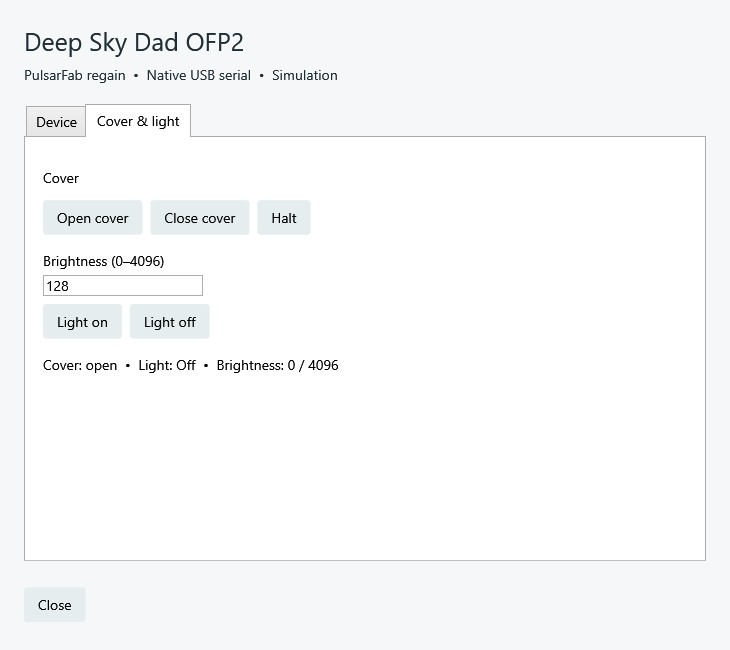
- Open Setup, refresh devices, select the panel, and connect. The Cover & light tab provides Open, Close, Halt, and brightness 0–4096.
- Close setup and connect from your application. The Start menu also includes an OFP2 setup shortcut.
Share the serial port between ASCOM clients
Regain runs one local OFP2 server and one serial worker for both 32-bit and 64-bit ASCOM applications. Each client connects independently; disconnecting one leaves the others connected. The final disconnect releases the port. Setup uses the same server and cannot disconnect a panel while an ASCOM client is using it.
Sharing applies to regain ASCOM clients. The vendor driver and regain Alpaca need exclusive access relative to this server. Use NINA's ASCOM selection when sharing with another ASCOM application.
Connect through Alpaca
- Connect USB and the external power supply. Disconnect the vendor driver and other apps using the panel’s serial port.
- Start the Alpaca server with the matching device worker from the same package beside it.
- Open
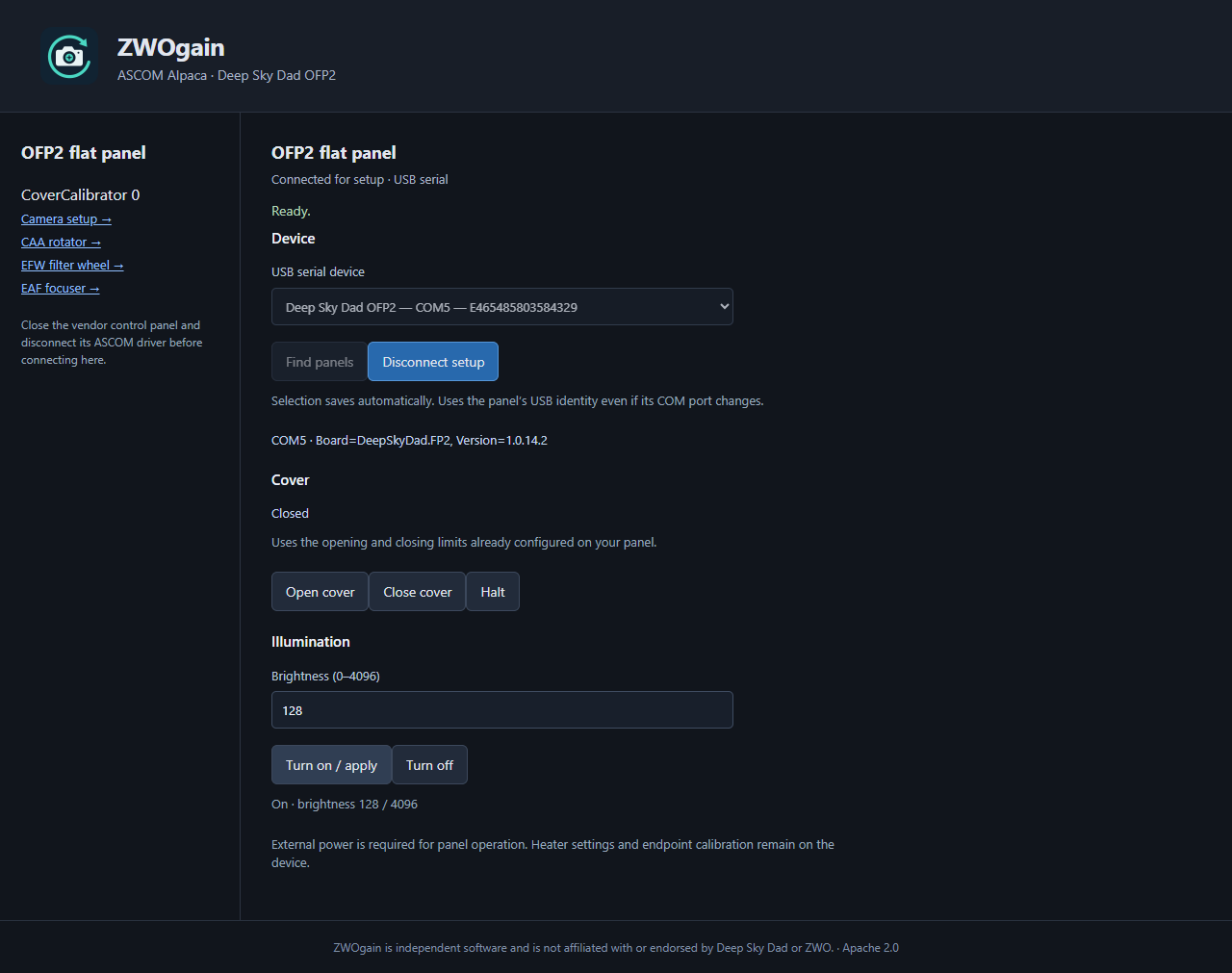
http://127.0.0.1:11111/setup/v1/covercalibrator/0/setup. - Choose Find panels, select the OFP2, and Connect for setup.
- Check cover clearance, then use Open, Close, Halt, and brightness 0–4096. Disconnect setup when finished and select the panel in your imaging client.
Serial connection and profiles
Native ASCOM saves the USB serial in %LOCALAPPDATA%\Regain\Accessories\ofp2-ascom.json. It needs .NET Framework 4.8 and ASCOM Platform; the standalone Alpaca server needs neither.
Windows uses the built-in USB serial driver. Linux needs access to the panel’s serial port, commonly /dev/ttyACM*; macOS normally uses /dev/cu.usbmodem*. Do not replace the Windows driver with WinUSB/Zadig.
The selected USB serial and stable UUID are stored in cameras.ofp2.json beside the Alpaca camera profile. Multiple Alpaca clients share one exclusive worker; the last disconnect releases it. A missing, busy, or ambiguous device fails rather than selecting another panel.
Protocol and hardware evidence
The Rust implementation verifies the board identity and product type before sending movement commands. Discovery uses read-only probes. Connecting does not change illumination, heater settings, or motion limits.
The OFP2 playbook records the serial protocol, Rust API, worker commands, and validation. The hardware evidence is kept alongside the code.