regain documentation
Cameras & recovery
Retry the download before repeating the exposure.
Use PulsarFab regain Retryable Camera in NINA, a native ASCOM camera entry, or an Alpaca camera slot. All three share the same recovery settings.
Choose SDK-free or SDK mode
Direct USB (experimental) talks to supported cameras without the ZWO SDK. On cameras with reread support, it can restart a failed download from the image still held in camera memory. That saves the original exposure, including a long integration.
ZWO SDK is the default for broader ASI support. The SDK runs in a separate worker so regain can restart it if it hangs. Download retries are possible while the SDK still reports an image ready.
| Camera | SDK-free capture | Same-image download retry | SDK mode |
|---|---|---|---|
| ZWO ASI2600MM Pro / Duo main sensor | Yes, experimental | Yes, in Direct USB still mode | Yes |
| ZWO ASI6200MM Pro | Yes, experimental | Yes, in Direct USB still mode | Yes |
| ZWO ASI676MC | Yes, experimental | Yes, in Direct USB still mode | Yes |
| ZWO ASI662MC | Yes, experimental | Yes, in Direct USB still mode | Yes |
| ZWO ASI585MM Pro | Yes, experimental | Yes, in Direct USB still mode | Yes |
| ZWO ASI220MM Mini / Duo guide sensor | Yes, experimental | No direct reread support | Yes |
| Other ZWO ASI cameras | No | Only while the SDK still reports an image ready | If supported by the bundled SDK |
Direct USB is experimental. In SDK mode, download retries depend on the SDK's ready-frame state; they do not use regain's direct memory reread.
Select the backend in camera setup before connecting. See direct capture limits for supported formats, binning, and exposure lengths. SDK-free capture still requires the OS camera USB driver.
Build a live preview with the Rust or worker APIs
Continuous acquisition keeps draining the camera even when a consumer is slow, retaining only the latest frame. SDK video and Direct USB video on ASI585MM Pro, ASI662MC and ASI676MC support live exposure/gain changes, settings generations and marked transition frames. Other direct cameras use repeated still captures.
Direct video accepts exposures up to 30 seconds and cannot reread a previous video frame. On ASI585MM Pro and ASI662MC, retained still capture uses a roughly 100 ms minimum frame interval for short exposures; this adds latency without changing integration time. Color-camera API clients can opt into shared software white balance and AWB; raw output is preserved by default.
These are Rust/worker features. NINA, ASCOM and Alpaca use still capture and do not expose new video or AWB controls. See continuous acquisition and white balance for API setup.
Set your retry policy
| Action | Default |
|---|---|
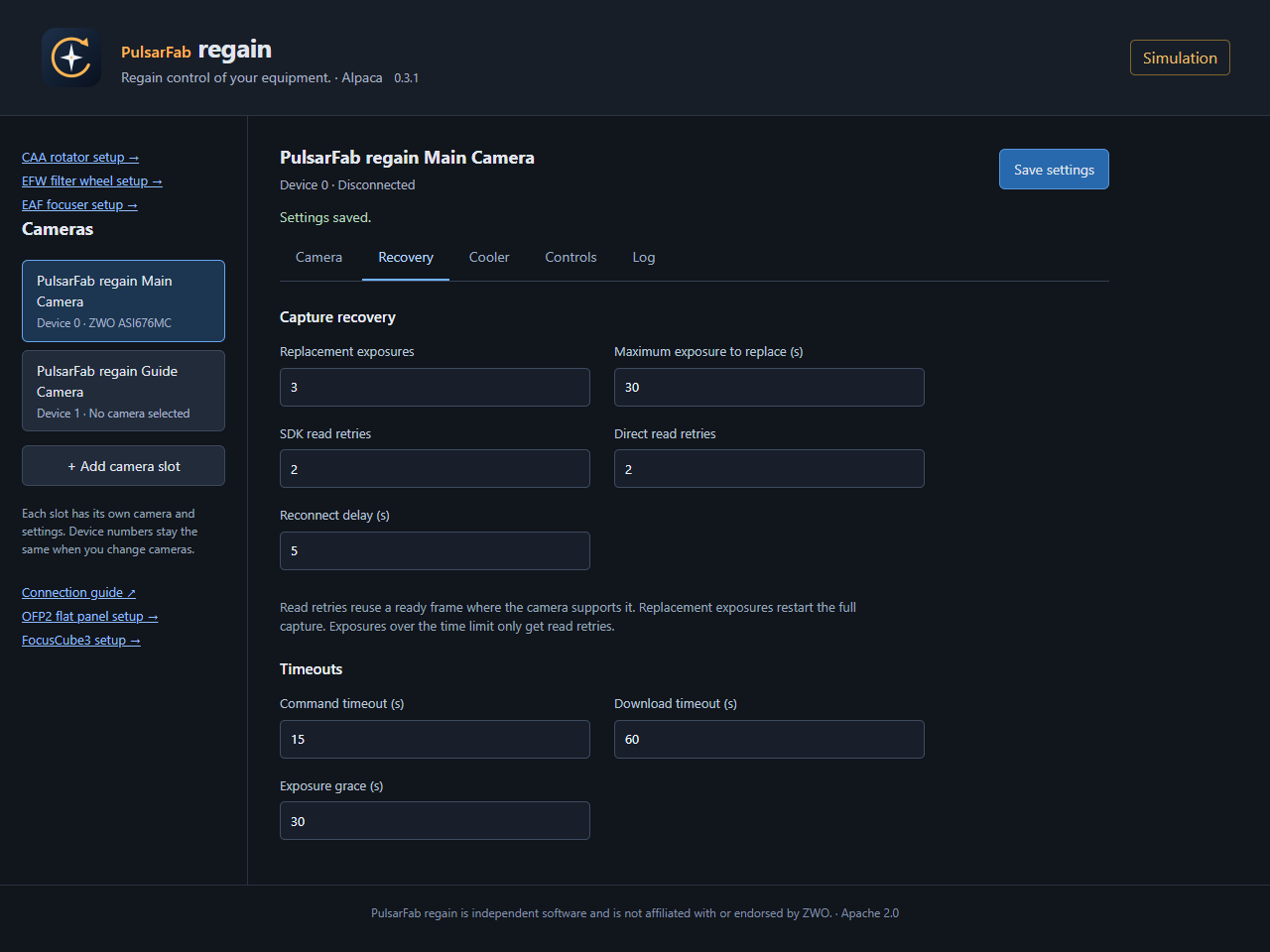
| Retry the image download | 2 retries |
| Reconnect and take a replacement exposure | 3 retries, for exposures up to 30 seconds |
| Wait before reconnecting | 5 seconds |
A download retry keeps the original exposure. A replacement exposure starts again. Direct cameras with reread support can retry downloads at any supported exposure length, independent of the replacement-exposure limit.
Set a retry count to zero to disable that action. Your imaging application waits during recovery and receives an error if recovery fails. Rereading requires the image to remain in camera memory; power loss can erase it.
Handle failed USB transfers directly
The SDK-free driver controls the transfer and the reread. It limits stalled downloads, cancels outstanding transfers safely, and rejects incomplete images. Each reread starts at the beginning of the retained image with a fresh download timeout.
Recovery depends on the camera keeping the frame available. For implementation details and tested recovery conditions, see the USB transport notes.
Recover a stuck USB camera
Set USB reset after failed attempts to 2 to try an ordinary reconnect first. This opt-in step is shared by NINA, ASCOM, and Alpaca. It runs at most once per capture, only when another replacement exposure is allowed. The retained image is abandoned; regain reconnects the same serial, restores settings and cooling, and takes a new exposure.
Windows cycles only the camera's USB port through an administrator helper. Interactive sessions may show UAC; unattended operation needs an elevated host. Linux supports device reset and optional port disable/enable with scoped permissions. USB cycling does not switch an external 12 V supply, and a hub may not physically remove USB power.
Supported USB identities are ASI585MM Pro, ASI662MC, ASI676MC, ASI2600MM Pro/Duo, ASI6200MM Pro and ASI220MM Mini, using either SDK or direct mode. Other SDK cameras are not yet eligible. Windows ASI676 reset and a fresh frame are hardware-verified; physical Linux validation is pending. See USB recovery setup and limitations.
Use the controls your camera provides
Both backends capture RAW16 with model-specific exposure and binning limits. Cooling and optional heater/fan/LED controls appear only when supported. ASI585MM Pro exposes cooler enable, temperature, target and power, but no controllable heater. ASI662MC has no cooling. The ASI585MM Pro direct driver does not cover ASI585MC variants.
Restore camera and cooler settings
After reconnecting, regain restores camera settings and waits for cooling to recover before a replacement exposure. If cleanup fails after a successful download, it keeps the image and reconnects before the next capture. Abort never starts a replacement exposure.
Optional SDK fallback
Enable Fall back to SDK to switch from Direct USB to the SDK after a failure. It keeps the same camera and stays in SDK mode until disconnect. Any replacement exposure still needs to fit your configured retry limit.
Logs record recovery attempts and final errors. See settings and troubleshooting for log locations.