regain documentation
Native Windows ASCOM
Local camera and accessory drivers with matching setup dialogs, for both 32-bit and 64-bit clients.
The native drivers launch local Rust workers. They do not connect through an Alpaca bridge and do not require an Alpaca server.
Keep the ASCOM side small
The camera driver is a thin .NET Framework COM adapter. Capture and recovery run in Rust workers over private binary pipes, with the camera SDK isolated in its worker when SDK mode is selected. This provides a local connection without an HTTP server or vendor control application. The native adapter still requires .NET Framework and ASCOM Platform.
Install and connect
- Install the requirements listed in Install & upgrade.
- Download the regain ASCOM setup executable from the release page. Close device-control apps and running Alpaca servers, then run the installer as administrator.
- In your application’s ASCOM Chooser, select a regain camera, CAA or Falcon V2 rotator, EFW filter wheel, EAF or FocusCube3 focuser, Wanderer ETA M54, or Deep Sky Dad OFP2.
- Open Setup, refresh devices, select the physical device, and configure its settings. Close setup and connect from your application.
The Start menu contains camera and accessory setup shortcuts. Four camera entries provide independent settings: Retryable Camera 1 through 4. Configure cameras 2–4 from their own Chooser entries.
Connect more than two cameras
For example, assign Retryable Camera 1 to your main imaging camera, 2 to the guider, and 3 to a second imaging train. A fourth entry is available for another camera. These are separate configurations for distinct physical devices, available to both 32-bit and 64-bit ASCOM clients.
- Open each camera entry’s own Setup dialog.
- Select its physical camera and save a distinct serial, especially when models match.
- Choose that camera’s SDK or Direct USB backend and recovery settings.
- Close setup, then connect the corresponding entry in each imaging application.
A missing or busy saved camera fails connection instead of silently selecting another one. For network clients, use Alpaca camera slots; their device numbers and UUIDs remain stable when changing the selected physical camera.
Matching controls
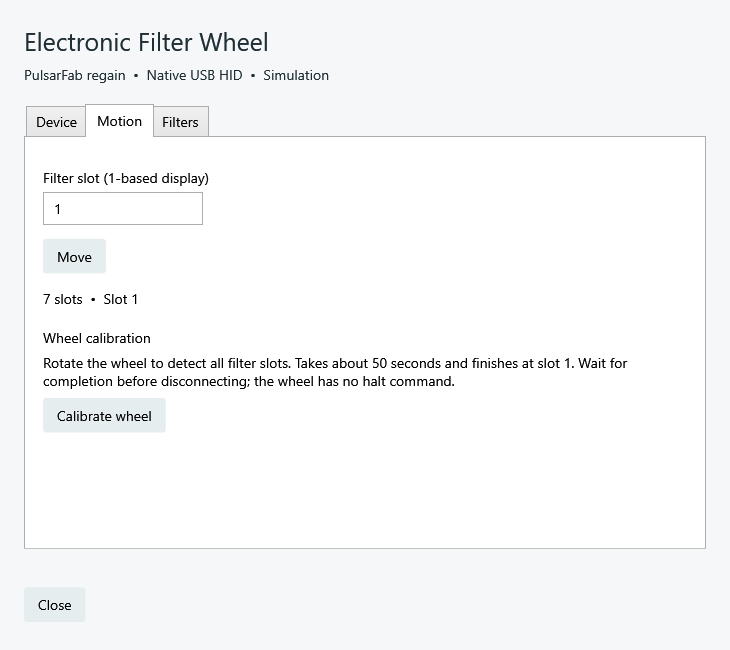
Camera setup groups device selection, recovery, cooler, and timeout settings. Accessory dialogs expose device selection, motion, and device settings in the same style. Standalone dialogs use a light theme; NINA-hosted controls inherit its theme.
OFP2 cover and flat panel
Select PulsarFab regain Deep Sky Dad OFP2 in the CoverCalibrator chooser. It shares one serial connection across 32-bit and 64-bit ASCOM clients and provides the same style of setup dialog. NINA can select it as an ASCOM flat panel. See OFP2 setup and sharing.
ETA tilt and back focus
Select PulsarFab regain Wanderer Astro ETA M54 in the focuser chooser. It uses a shared serial server and the same setup style as other regain accessories. Read the ETA guide for movement limits and the absence of a hardware halt command. Physical movement validation is pending.
Pegasus device sharing
FocusCube3 and Falcon V2 use Regain.Pegasus.ASCOM.exe across 32-bit and 64-bit applications. Clients of each device share its serial connection with independent leases; disconnecting one leaves siblings connected. Choose PulsarFab regain Pegasus Falcon V2 in the Rotator chooser. Sharing does not extend to native NINA, Alpaca or Unity. See FocusCube3 setup and Falcon V2 setup.
Portable registration
Extract the complete ASCOM ZIP to a permanent folder. In an administrator PowerShell opened there:
$p = Start-Process .\Regain.ASCOM.Register.exe -ArgumentList /regserver -Wait -PassThru
if ($p.ExitCode) { throw 'Registration failed; check the registration log' }
Use /unregserver before deleting a portable install. Keep assemblies, Rust workers, and SDK libraries together. The old ASCOM.ZWOgain.* ProgIDs are intentionally preserved for compatibility.
Updates and validation
The installer refuses to replace files in use. No background service or firewall rule is installed automatically. Settings survive upgrades and uninstall. Automated COM and simulator checks cover both client bitnesses; a full ASCOM ConformU run remains outstanding.