regain documentation
Connect in NINA
Install from the shared plugin registry and select a native regain device in the equipment chooser.
Add the plugin source
For shared equipment sources, combined safety/weather/switch outputs and group operations, see the 0.6 Hub development preview. Those providers attach directly to the local host and are not in published 0.5 packages.
https://nina-plugins.pulsarfab.com/- Open NINA’s plugin repository settings and add the source URL.
- Refresh available plugins, install PulsarFab regain, and restart NINA. Existing ZWOgain installations update through the same plugin entry.
- Choose the regain device in the relevant equipment list and open its setup gear.
- Refresh devices, select the intended serial, configure settings, and close setup before connecting in NINA.
Equipment entries
- PulsarFab regain Retryable Camera
- PulsarFab regain CAA Rotator
- PulsarFab regain EFW Filter Wheel
- PulsarFab regain EAF Focuser
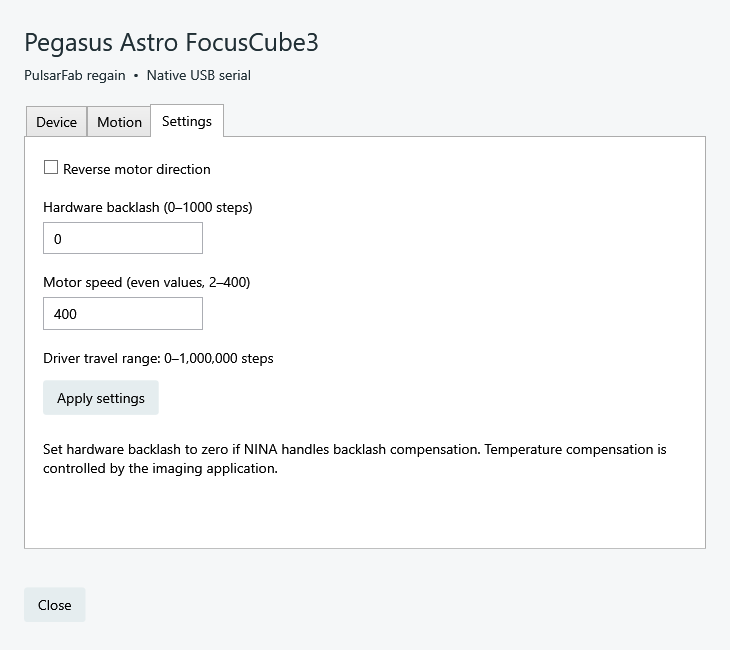
- PulsarFab regain Pegasus FocusCube3
- PulsarFab regain Pegasus Falcon V2 — rotator setup and origin controls
- PulsarFab regain Wanderer Astro ETA M54 — back focus and tilt, physical movement validation pending
For the OFP2 flat panel, use native ASCOM or Alpaca discovery. NINA can share the native ASCOM connection with other ASCOM applications.
Set up your camera
Choose Direct USB (experimental) for SDK-free capture on supported cameras, or keep ZWO SDK for broader ASI support. Check which cameras support same-image download retries. Pick the camera and save its serial when multiple cameras share a model. Main and guide cameras are separate USB devices. Disconnect other camera applications first.
Set retries and cooler recovery in the setup dialog. Recoverable failures are logged while NINA waits; exhausted recovery returns an error. See camera recovery behavior before increasing replacement-exposure limits.
Focus and filters
EFW filter names and focus offsets are configured in setup; NINA keeps its per-filter exposure and autofocus settings. Set hardware backlash to zero if NINA handles backlash compensation. Temperature compensation remains the imaging application’s responsibility.
Share a Pegasus device with another ASCOM client
Select the regain ASCOM FocusCube3 focuser or Falcon V2 rotator in NINA instead of the native plugin provider. ASCOM clients of that device share its position and serial connection. The native plugin cannot connect alongside the ASCOM server. See port ownership.